Header and footer
Headers and footers are drawn in the page margins with CSS Paged Media. A template puts content there in three ways:
| Way | Content | Where it is defined |
|---|---|---|
| Text and counters in a margin box | Fixed text, page numbers | page.css, or any CSS of the template |
Named strings (string-set) |
Text copied from the document, such as the title | page.css |
Running elements (position: running()) |
Any HTML: a logo, several lines, styled spans | header.html plus page.css |
Margin boxes
Every page has 16 margin boxes around the page area. The page below is rendered by ope with a template that fills each box with its own name (examples/_templates/margin-boxes/page.css). Headers and footers mostly use the three boxes of the top and the bottom edge.
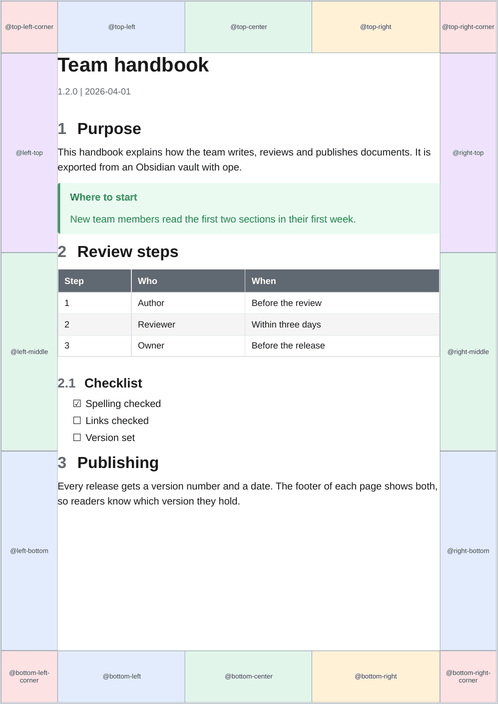
A box is only as wide as its content unless it gets a width. The three boxes of an edge share its width, so width: 33.333% gives each of them a third.
A box shows its content. Text, counter(page), counter(pages), string(...) and element(...) can be combined:
@page {
  @bottom-right {
    content: "Page " counter(page) " of " counter(pages);
    font-family: Arial, sans-serif;
    font-size: 7pt;
    color: #606872;
  }
}
A margin box does not inherit the font of body. Set font-family and font-size in each box. \A in a string is a line break when the box has white-space: pre.
The margins of @page are the room for the boxes. A header that is 20pt tall in a 25mm top margin leaves about 5mm between the header and the text. Widen the margin or shrink the header.
Named strings: text from the document
string-set copies the text of an element into a named string. A margin box shows it with string(). The title block that ope writes at the start of every document holds the title, subtitle and the version line:
<header id="title-block-header">
  <h1 class="title">Team handbook</h1>
  <p class="subtitle">How we work</p>
  <p class="author">1.2.0 | 2026-04-01</p>
</header>
So a template folder, which has no Python, can still show them:
header#title-block-header .title  { string-set: doc-title content(); }
header#title-block-header .author { string-set: doc-meta content(); }

@page {
  @top-left    { content: string(doc-title); }
  @bottom-left { content: string(doc-title) " · " string(doc-meta); }
}
The author line holds the version label and the date: --version or the short commit hash, then --date.
Running elements: HTML in the margin
An element with position: running(name) is taken out of the page flow and can be placed in a margin box with element(name). In a template folder, the elements are written in header.html (the running_html of template.yaml), which ope puts right after <body>:
<img class="logo" src="logo.svg" alt="Logo">
<div class="address">Example Ltd. · 1 Sample Street · 12345 Sample City</div>
.logo    { position: running(logo); width: 40mm; }
.address { position: running(address); font-size: 7pt; }

@page {
  @top-right { content: element(logo); vertical-align: bottom; }
}
@page :first {
  @top-left { content: element(address); vertical-align: bottom; }
}
The default template uses a running element for its header too: div.pdf-running-header with span.pdf-header-title and span.pdf-header-subtitle, placed in @top-left.
A running element must come before the first page it appears on. Elements in header.html are at the very start of the document, so they show from page 1.
Images and fonts in header.html and page.css are turned into data URIs when the template is loaded, see assets.
First page and other page selectors
@page :first {
  margin-top: 40mm;                       /* room for a letterhead */
  @top-left { content: element(address); }
}
@page :first { @top-left { content: none; } }  /* no header on page 1 */
@page :left  { @bottom-left  { content: counter(page); } }
@page :right { @bottom-right { content: counter(page); } }
@page :blank { @top-left { content: none; } }
:left and :right are useful for printed, double-sided documents.
Landscape pages
Wide tables and wide diagrams are placed on a named page, landscape-page. A template that changes the page margins or the header should set them for that page too, or the landscape pages keep the old margins:
@page landscape-page {
  size: A4 landscape;
  margin: 20mm 20mm 18mm 20mm;
  @top-left { content: string(doc-title); }
}
ope wraps each wide table and diagram in .wide-table-section. The template's CSS sends that wrapper to the named page. default.css does it like this, and a template written from scratch needs the same rules:
@page landscape-page { size: A4 landscape; margin: 25mm 20mm 22mm 20mm; }
.wide-table-section { page: landscape-page; break-before: page; break-after: page; }
Margin boxes of the plain @page rule also apply to the named page unless the named page sets them.
Escaping
- HTML in
header.htmlorrunning_htmlmust be valid: write&,<and". - Text in a CSS string needs CSS escaping:
\becomes\\,"becomes\"and a newline\A. Python templates build these strings from user data, so escape them there (see Python templates).