Folder Notes
ope export ROOT walks the folder ROOT. Every subfolder becomes a section. The Folder Notes plugin stores the note of a folder inside it, with the folder's name: Chapter A/Chapter A.md. The folder_notes plugin maps that note onto its folder while the page tree is built, so the note becomes the text of the folder's section. The root note ROOT/ROOT.md is the first text of the document.
Folder
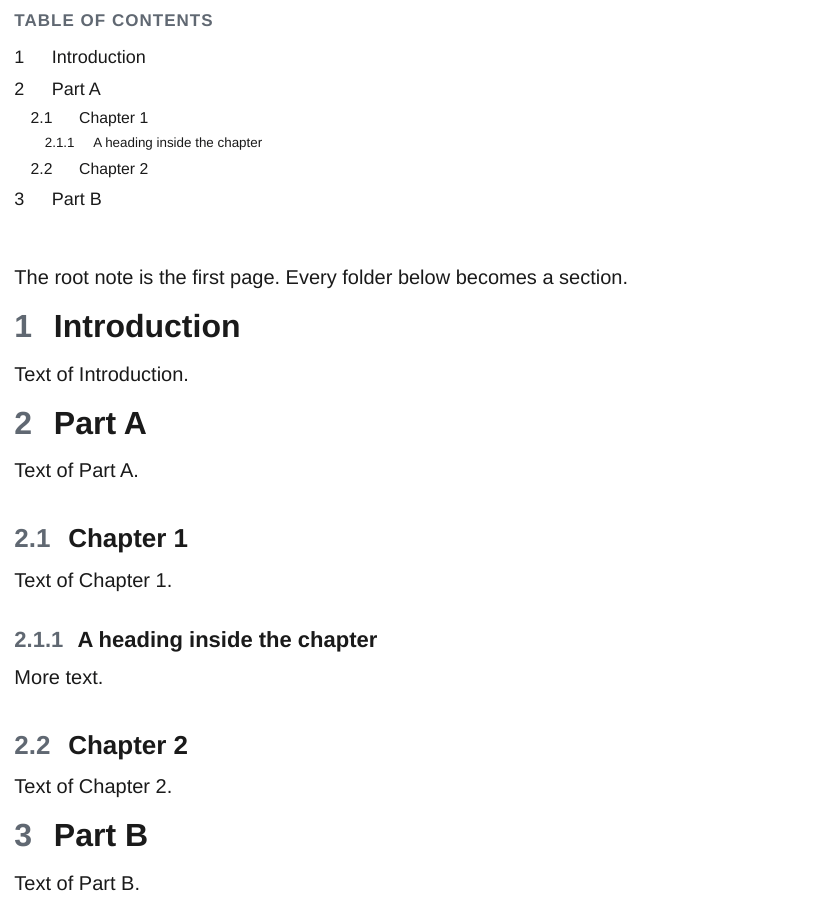
Without the plugin
With --disable-plugin folder_notes the folders still become numbered sections, with the folder name as heading, but the sections have no text: Folder/Folder.md is not used.
Sections, table of contents and numbering
- Sections are sorted by folder name. The folder name is the section heading.
- Headings are numbered and listed in the table of contents.
--no-tocleaves out the table of contents. - Headings inside a note nest under the section heading, so a note's
##sits one level below its folder. --includeand--excludepick top-level subfolders by name.- Folders without Markdown, such as attachment folders, are left out.
.git,.obsidian,.vscodeand every other dot folder are skipped.
The root note
Three layouts are recognised:
Handbook/Handbook.mdexists: it is the root note.Handbook/Handbook/Handbook.mdexists: the inner folder is the root, its siblings become sections.- Neither: the root has no text, the subfolders are the sections.
The vault
Links, embeds and images are looked up in the whole vault, not only in the exported folder. The vault is the folder that holds .obsidian, or else the root of the git repository. When several files share a name, the one closest to the linking page wins: Part A/img/logo.png beats images/logo.png for every page inside Part A/.
Other conventions
A third-party plugin can change the convention with the find_folder_note hook, for example to use Folder/README.md or the note with folder-note: true in its frontmatter. See Write a plugin.