Dataview
The dataview plugin runs Dataview at export time: ```dataview blocks, inline queries, inline fields and DataviewJS. The query language, the function library, the page model and the views are a port of the Dataview sources (version 0.5.68), so a query gives the same rows, columns and order as in Obsidian's reading view. The result is written into the page as Markdown, so links to notes that are part of the export become links inside the PDF (other notes are shown as plain text, see links to pages outside the PDF).
The examples query these notes:
---
mood: good
---
Worked on the launch. [hours:: 6]

- [x] Send the draft to Ana ✅ 2026-03-30
- [ ] Book the venue 📅 2026-04-03
    - [ ] Compare two offers
The query runs over the whole vault (the folder with .obsidian, or the git repository). Without a vault root the blocks stay as they are.
TABLE
Markdown
```dataview
TABLE status, owner, due
FROM #project
SORT due ASC
```

```dataview
TABLE WITHOUT ID file.link AS "Project", due - date(today) AS "Time left"
FROM #project
WHERE status != "done"
SORT due ASC
```

```dataview
TABLE rows.file.link AS "Projects", length(rows) AS "Count"
FROM #project
GROUP BY status
```
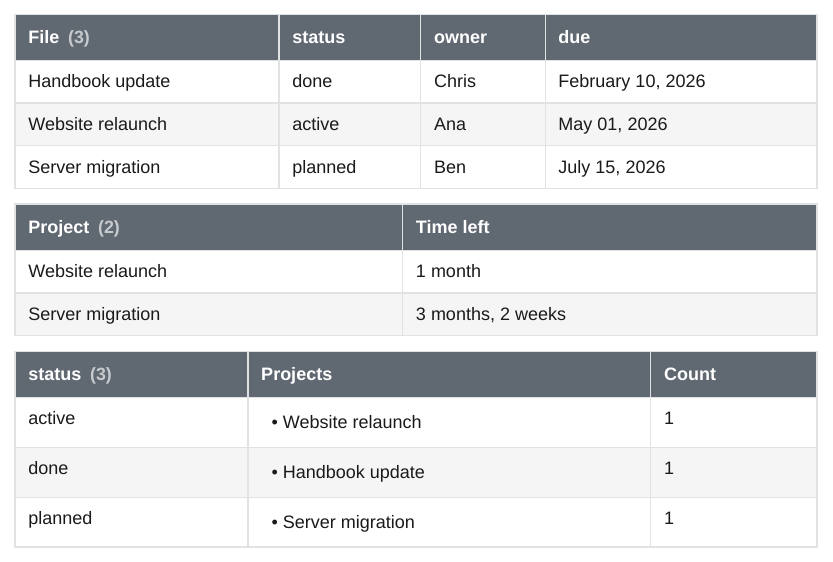
TABLE a, b, withAS "Name"for a column header andWITHOUT IDto drop the first column.- The first header shows the number of results,
File (3), as Dataview does. TheFileheader istableIdColumnNameof the settings; afterGROUP BYit is the name of the group. - A list in a cell becomes a bullet list, an empty value shows
renderNullAs(-), dates usedefaultDateFormatanddefaultDateTimeFormat, durations read like3 months, 2 weeks. - Text values are Markdown, as in Obsidian: links, emphasis and lists in a property show as such.
- A query with no results shows Dataview's dashed box with "No results to show for table query." (
warnOnEmptyResult).
LIST
Markdown
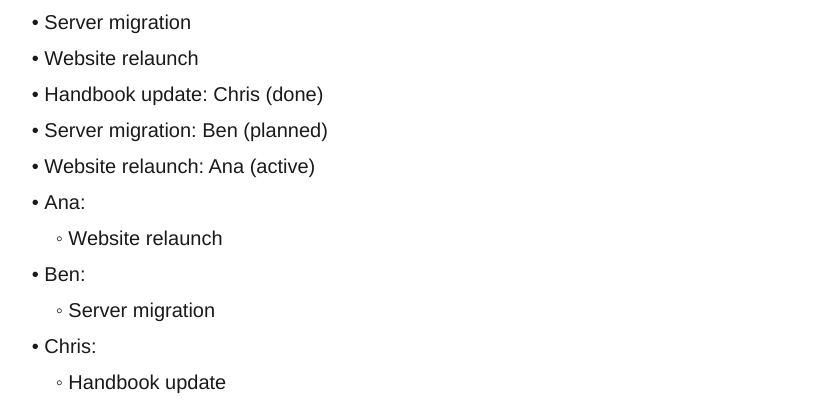
LIST shows the file link, LIST expr shows link: value, and LIST WITHOUT ID expr only the value. After GROUP BY the group is the first part.
TASK
Markdown
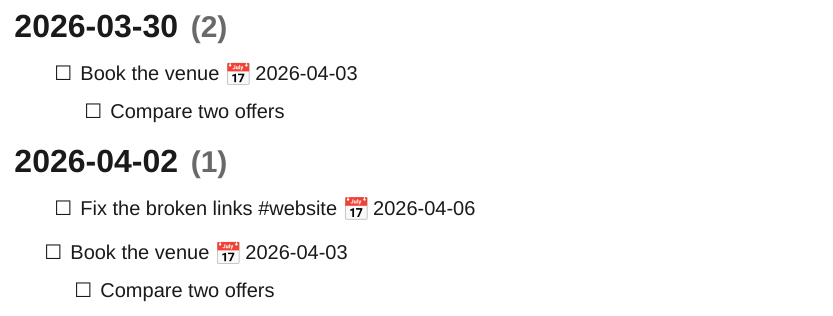
TASK lists the tasks of the selected notes, with their subtasks. A subtask that is also a result is shown once, under its parent. GROUP BY puts each group under a heading with its count. Any status other than a space shows a checked box, as in Dataview. The task fields are those of Dataview: status, checked, completed, fullyCompleted, text, line, section, link, children, parent, tags, outlinks, the page fields, and due, completion, created, start and scheduled from inline fields ([due:: 2026-04-03]) or from the emoji of the Tasks plugin (📅 ✅ ➕ 🛫 ⏳).
CALENDAR
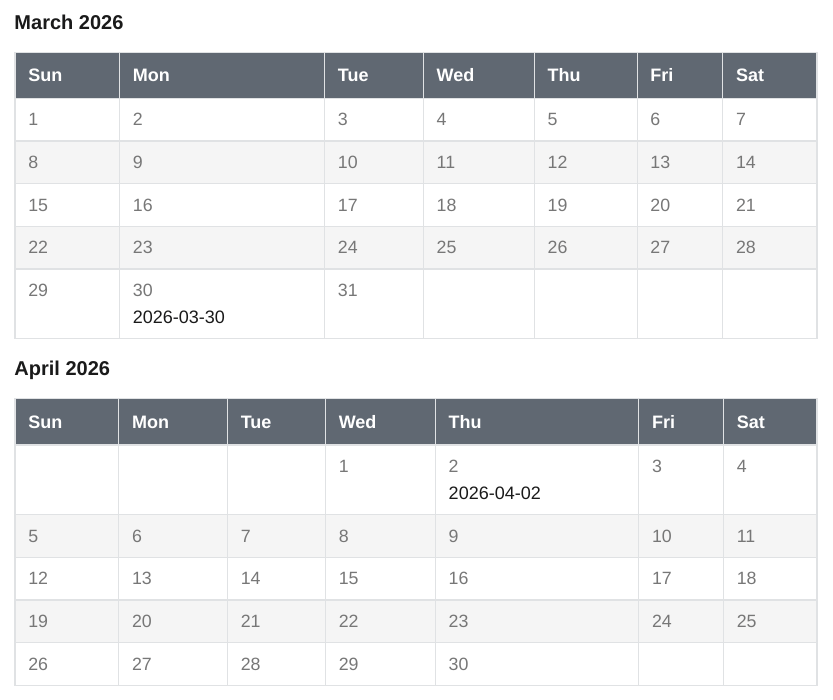
Obsidian shows an interactive calendar of the current month. The PDF shows one month grid (Sunday first) for every month that has results, with the notes under their day.
Inline queries and inline fields
Markdown
---
reviewer: Ben
Review Date: 2026-04-02
---
Reviewed by `= this.reviewer` on `= this.review-date`.
The website relaunch is owned by `= [[Website relaunch]].owner` and due in `= [[Website relaunch]].due - date(today)`.
Hours logged in the journal: `= [[2026-03-30]].hours + [[2026-04-02]].hours`.

Inline fields: [effort:: 3 days] and (approved:: true).

`= expr`is replaced by the value of the expression, withthisfor the current note. The prefix isinlineQueryPrefixof the settings.[key:: value]shows the key and the value,(key:: value)only the value, rendered like reading view does whenprettyRenderInlineFieldsis on. A field that fills a whole line,key:: value, stays as written.
DataviewJS
Markdown
```dataviewjs
const projects = dv.pages("#project").sort(p => p.due, "asc");
dv.header(4, "Projects by owner");
for (const group of projects.groupBy(p => p.owner)) {
  dv.paragraph(`**${group.key}**: ${group.rows.file.name.join(", ")}`);
}
dv.table(["Project", "Due", "Done"],
  projects.map(p => [p.file.link, p.due, p.status === "done" ? "yes" : "no"]));
const open = dv.pages('"_notes/Journal"').file.tasks.where(t => !t.completed);
dv.paragraph(`Open tasks: ${open.length}`);
```

Open projects: `$= dv.pages("#project").where(p => p.status != "done").length`
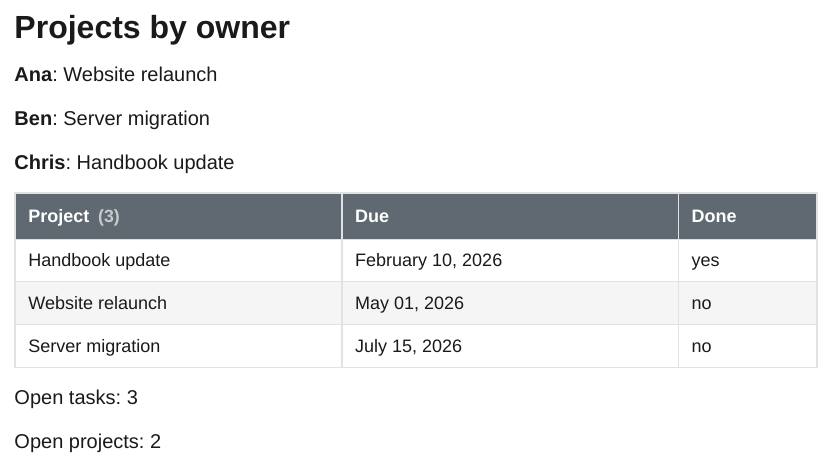
```dataviewjs blocks and `$= ...` inline queries run in an embedded V8 engine (mini-racer), so no Node.js is needed. The dv object provides:
- data:
dv.pages(source),dv.pagePaths(),dv.page(),dv.current(), with Dataview'sDataArray(where,filter,map,flatMap,sort,groupBy,groupIn,distinct,limit,slice,first,last,array,length,values,sum,avg,min,max, and field access likepages.file.name), - queries and expressions:
dv.query(),dv.tryQuery(),dv.queryMarkdown(),dv.execute(),dv.evaluate(),dv.tryEvaluate(),dv.func.*(the DQL functions), - output:
dv.table(),dv.list(),dv.taskList(),dv.header(),dv.paragraph(),dv.span(),dv.el()(withclsandattr),dv.container,dv.view(), anddv.markdownTable(),dv.markdownList(),dv.markdownTaskList(), - values:
dv.date(),dv.duration(),dv.fileLink(),dv.sectionLink(),dv.blockLink(),dv.parse(),dv.literal(),dv.compare(),dv.equal(),dv.array(),dv.luxon(Luxon 3.4) anddv.io.load()anddv.io.csv()for files of the vault.
The script has no network, no require, no Obsidian app and no file writes; dv.io only reads files inside the vault. Every block has a time limit of 10 seconds (-O dataview.js-timeout=30 changes it). An error is shown like in Obsidian (Evaluation Error: ...) and printed as a Warning:. A dv.header() is a heading that is not numbered and not in the table of contents.
Queries
| Part | Supported |
|---|---|
| Query types | TABLE (WITHOUT ID, AS), LIST (LIST expr, WITHOUT ID), TASK, CALENDAR |
| Data commands | WHERE, SORT (several keys, ASC/DESC), GROUP BY (with rows), FLATTEN, LIMIT, in any order and repeated; // comments |
| Sources | #tag (nested tags count), "folder" or "folder/note", [[note]] (notes that link to it), outgoing([[note]]), csv("file.csv"), combined with and, or, - or ! and parentheses |
| Literals | numbers, "text", true, false, null, [lists], {objects}, [[links]], ![[embeds]], date(2026-04-01), date(today), date(now), date(sow) and the other shorthands, dur(1 week 2 days) |
| Operators | + - * / %, = != < > <= >=, and, or, !, a.b, a["b"], list[0], (x) => expr, row.field, this.field, [[note]].field |
| Functions | all of Dataview's: object, list, date, dur, number, string, link, embed, elink, typeof, round, trunc, floor, ceil, min, max, sum, product, average, minby, maxby, contains, icontains, econtains, containsword, extract, sort, reverse, length, nonnull, firstvalue, all, any, none, join, filter, map, flat, slice, unique, reduce, regextest, regexmatch, regexreplace, replace, lower, upper, split, startswith, endswith, padleft, padright, substring, truncate, default, ldefault, display, choice, striptime, dateformat, durationformat, currencyformat, localtime, hash, meta |
Values follow Dataview: functions work on each element of a list where Dataview does, comparisons of mixed types order by type, null sorts first, text sorts like localeCompare, dates and durations follow Luxon (a month is 30 days, date - date is normalised into years, months, weeks, days and time). A row whose expression fails is left out; when every row fails, the query shows Dataview's error text. A query that does not parse shows the parser error, and the export prints a Warning:.
Pages
Every note has the file fields of Dataview: name, folder, path, ext, link, size, ctime, cday, mtime, mday, tags (with parent tags), etags, inlinks, outlinks, aliases, lists, tasks, frontmatter, day (from a date field or a date in the file name) and starred (from .obsidian/bookmarks.json).
Frontmatter properties are fields, with a normalised key next to the written one (Due Date is also due-date). Text that is a date, a duration or a link becomes one. Inline fields (key:: value, [key:: value], (key:: value)) in paragraphs, headings and list items are fields too, with values parsed as numbers, dates, durations, links, booleans and lists.
ctime and mtime come from the file system, as for Bases. After a git checkout they are the checkout time, not the commit time.
The order of results without SORT is the order of the vault tree, folder by folder and case-insensitive (Obsidian uses the order it indexed the files in).
Settings
The settings of the Dataview plugin are read from .obsidian/plugins/dataview/data.json: renderNullAs, defaultDateFormat, defaultDateTimeFormat, tableIdColumnName, showResultCount, warnOnEmptyResult, maxRecursiveRenderDepth, inlineQueryPrefix, inlineJsQueryPrefix, enableInlineDataview, enableDataviewJs, enableInlineDataviewJs, prettyRenderInlineFields and dataviewJsKeyword. Without the file the defaults of Dataview apply, except that DataviewJS is on. Each setting can be changed for one export:
-O dataview.now=2026-04-01T09:00 fixes date(now) and date(today), so a PDF can be made again with the same content.
Differences to Obsidian
- Interactive parts have no PDF form: tasks cannot be checked and the calendar is a static grid.
- Names of months and days are English (
en-US), whatever the language of the system. dv.funcfunctions get values, not JavaScript functions (dv.func.map(list, x => ...)does not work; use theDataArraymethods).dv.el()elements support the common DOM methods but have no real browser behind them.- An embed in a cell (
![[note]]) is shown as a link; images are shown. inlineQueriesInCodeblocks: inline queries in fenced code blocks are not evaluated.