Templates and styling
A template decides how the PDF looks: fonts, colours, page size and margins, the running header and footer, and the style of every element. It does not change what is in the document. That is the job of the steps and plugins.
The PDF is laid out by WeasyPrint, which supports CSS Paged Media: @page rules, margin boxes, running elements, named pages and page counters. Templates are written in that CSS.
Built-in templates
| Name | Look |
|---|---|
default |
A4 portrait. Document title at the top left, date at the bottom left, version and page counter at the bottom right. |
redline |
Same as default, plus the styles for tracked changes. Used by ope redline. |
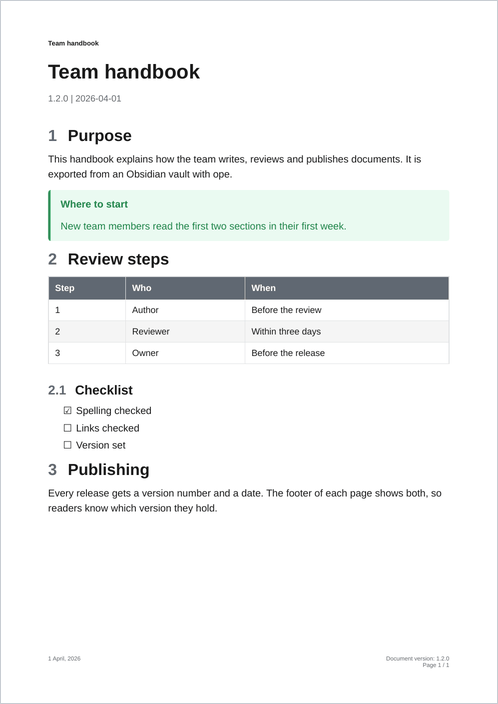
default template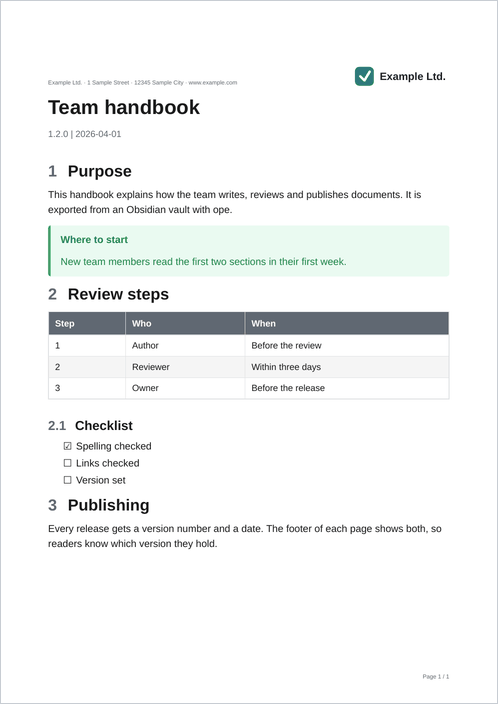
Three ways to make a template
| Way | Good for | Page |
|---|---|---|
One CSS file: -T ./brand.css |
Changing styles only. | Template folders |
A folder with CSS, template.yaml, header HTML and page CSS: -T ./my-template/ |
A logo, a letterhead, a new footer. No Python. | Template folders |
| A Python class registered as entry point | Header and footer text from the title, version or -O options, changes to Markdown or HTML. |
Python templates |
Start with the recipes: each one is a complete template with a picture of the result.
How --template is resolved
ope export ./Vault --template default        # a name
ope export ./Vault --template ./brand.css    # a CSS file
ope export ./Vault --template ./my-template  # a folder
ope list-templates                           # every name and where it comes from
- A value that is an existing path is loaded as a CSS file or template folder.
- Any other value is a name, looked up in this order (a later source wins on equal names):
- built-in templates,
- templates of installed packages (entry point group
obsidian_pdf_exporter.templates), - folders in the user templates folder,
- templates registered at runtime with
register_template().
The user templates folder is $XDG_CONFIG_HOME/obsidian-pdf-exporter/templates (default ~/.config/obsidian-pdf-exporter/templates). OBSIDIAN_PDF_EXPORTER_TEMPLATES_DIR points it somewhere else. Each subfolder is a template folder, named after the folder or the name in its template.yaml.
An unknown name ends the export with exit code 2.
What a template does in an export
notes → steps and plugins → template.process_markdown → pandoc → HTML steps
      → template.process_html → header/footer HTML and page CSS added → WeasyPrint → PDF
The template CSS is linked from the HTML. Its rules come after the base CSS of ope, so a template can restyle everything ope adds. The CSS reference lists the elements and classes to style. Debugging shows how to look at the HTML WeasyPrint gets.